
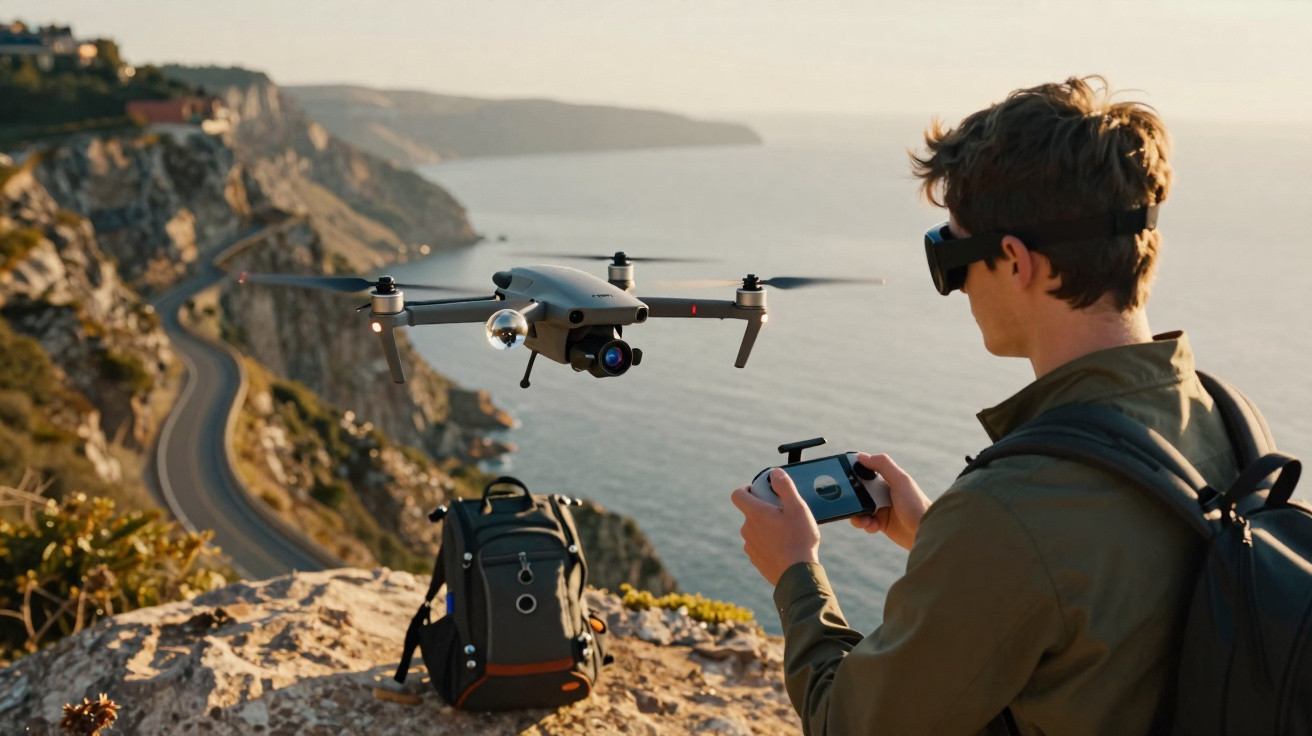
360° action cameras that sit on the ground have been around for years: Insta360 led the way, and GoPro and DJI have all added them to their ranges. The missing piece was simply putting that kind of camera on a drone, so you can gain some altitude. Insta360 did exactly that with the Antigravity A1, launched at the end of 2025, with pricing as lofty as the concept itself (€1,400 for the most basic bundle). One quarter later, DJI entered the game with the Avata 360: an FPV drone with a native spherical camera, available from €459. In this new segment, that figure is surprisingly low.
So does a drone that shoots 8K 360° video for less than an entry-level DSLR actually make sense? And what compromises are needed to hit that price? As you’d expect, we used this slightly-too-hot spring to put it through its paces.
A “cinewhoop” you recognise instantly
The Avata 360 sticks to the Avata family’s “cinewhoop” blueprint: a compact frame, built-in prop guards, and understated grey finishes. Unlike the Antigravity A1, it’s not a design that screams excitement. On the scales, the drone with its battery comes in at 468 grams. Even so, it remains within the 455-gram regulatory threshold thanks to an approximately 3% tolerance included in European standards.
That means it falls under the restrictions linked to class C1: registration and training are mandatory (but free) via AlphaTango, and a maximum altitude of 120 metres applies. We wouldn’t dream of adding any accessories, as that could push it out of C1 and into the DGAC’s administrative nightmare.
At the centre sits the optical module, made up of two fisheye lenses, each covering a 200° field of view. The camera is mounted on an axis that lets it tilt through 90°. Together with the landing “gear” that lifts the drone slightly off the ground (in practice, four rubberised pads built into the gimbal and the battery), this does a good job of protecting the lenses during take-off and landing.
If something does happen to the lenses, you can replace them yourself in just a few minutes. You’ll need a repair kit sold for €21. We strongly recommend ordering it with the drone, because even a small scratch on a lens can ruin the stitching and, by extension, the entire video.
8K 360° capture
DJI hasn’t tried to reinvent the wheel on the camera side, since it uses the same dual 1/1.1-inch sensors found in the Osmo 360, each at 64 megapixels. The f/1.9 aperture is a genuine benefit in low light. In 360° mode, it records up to 8K at 60 fps in HDR, with footage saved at a maximum bitrate of 180 Mbps. For photos, panoramic output reaches 120 megapixels.
Subscribe to Presse-citron
Stitching the two streams together is fully automatic. You can refine the join in post using DJI’s own DJI Studio software-assuming your computer is powerful enough. Otherwise, proxy files (lower-resolution versions of the originals, with the full files only used for the final render) are the practical way to preview edits smoothly. Stitching is perfectly controlled from two metres away from the subject. Any closer than that, parts of the image may disappear and reappear. It’s worth keeping in mind while filming.
The Avata 360 offers two recording approaches. In 360° mode, both sensors capture simultaneously to create a complete spherical clip. In single-lens mode, only one sensor is used to generate 4K at 60 fps, very much in the style of the original Avata, with RockSteady or HorizonSteady stabilisation.
For stills, RAW capture is available in both modes. In 360° RAW, you end up with two files that must be stitched manually in post-production-something best left to professionals who know exactly what they’re doing.
The Avata 360 includes 64 GB of internal storage, but only 42 GB is available for video recording (the firmware has to live somewhere). That works out at roughly 30 minutes of 8K 360° footage. There’s also a microSD slot supporting up to 1 TB, which gives plenty of headroom. You can transfer files either via Wi‑Fi 6 to a smartphone, or by USB‑C cable to a computer. In the latter case, it shows up as a standard external drive-and you don’t even need to power it on to copy the contents.
Reassuring controls or immersive FPV: it’s your choice
The Avata 360 uses DJI’s O4+ transmission system, with latency reduced to 130 ms when paired with Goggles. That rises towards 200 ms when using the radio controller. One of the Avata 360’s most distinctive traits is that it can be flown either with a conventional RC 2 controller, or in FPV using the Goggle N3 headset and the RC Motion 3 gesture controller.
The first option is the obvious pick if you want to keep costs down-or if you already own a drone that uses the same controller. In that case, you only need the drone on its own, sold for €459. If you’re chasing thrills and immersion, the second setup is far more intoxicating. As with the RC 2, buying the headset and motion controller is only required if you don’t already have them.
Either way, you have to choose: you can’t pair an RC 2 controller with a headset. It’s also worth noting that the Avata 360 doesn’t operate autonomously like the Neo 2, and it can’t be flown via a smartphone over direct Wi‑Fi.
Having two control methods-where the A1 is limited to headset plus gesture controller-is a clear advantage for the Avata 360, especially for pilots who find headset flying (which is notably more technical) a bit daunting.
The Avata 360 includes omnidirectional obstacle detection that cannot be switched off, unlike obstacle avoidance. That means you can, for example, fly through branches or tight gaps-situations the aircraft refuses by default. Sport mode also disables avoidance and allows speeds up to 65 km/h (18 m/s). The forward obstacle detection is particularly convincing, with LiDAR providing accurate terrain recognition.
Whether you fly with the controller or the Goggles, handling feels enjoyable, and the low latency never becomes an issue. The live feed is 1080p at 60 fps and stays smooth, even with a few obstacles around (trees or buildings). DJI quotes a range of up to 10 km, but remember that regulations require you to maintain visual line of sight at all times…
In our testing, real-world battery life landed between 18 and 20 minutes, a little lower than DJI’s stated 23 minutes. When the battery gets too low, the drone attempts to land. You can keep it airborne for an extra two minutes to bring it closer back to your take-off point. Our review unit arrived with three batteries, which let us fly for almost an hour without needing to reach for the charger.
Strong recording and editing options
The Avata 360 does more than simply fly while filming everything around it. Spotlight Free automatically locks a moving subject in frame without you needing to intervene during flight. GyroFrame lets you freely adjust the viewing angle from 360° footage inside DJI Fly or DJI Studio.
When using the Goggles, we were genuinely impressed by head tracking: the headset detects your movements and virtually points the camera wherever you look-up, down, left, right. It really does feel like you’re sitting on the drone.
DJI Studio also provides virtual camera moves in post: barrel rolls, loops, “tiny planet”, and rotations. It supports LUTs, plus exports in 9:16 or 1:1 for social platforms. Professionals will also value D‑Log M colour handling with 10‑bit export.
On the other hand, the Avata 360 doesn’t offer automated Waypoints flights, nor Timelapse or Hyperlapse sequences. Perhaps a future update will add them?
Our verdict on the DJI Avata 360
DJI has pulled off something fairly rare: launching a product that effectively creates its own category, without pretending to be something it isn’t.
The Avata 360 isn’t the best drone for traditional aerial photography-the Mavic 4 Pro still has the edge there. But that’s beside the point, because it wasn’t designed for it. For immersive video, FPV-style shots, and aerial 360° content without the hassle of a pole, there’s nothing else at this price. At €459 for the drone alone, it’s a genuine game-changer: for the first time, a high-end 360° drone feels accessible without having to sell a kidney.
It produces beautiful footage, feels highly dependable, and offers two distinct piloting styles-something that should appeal to conventional drone users who might be intimidated by flying with a headset.
As compelling as it is, the Avata 360 isn’t without minor drawbacks. The real-world 18-minute endurance is a bit short, stitching can be tricky when filming at under two metres, and missing features such as Waypoints routes or Hyperlapse may frustrate some pilots. Still, these downsides don’t undermine the excellent overall impression the Avata 360 leaves.
DJI Avata 360
From €459
Overall score
9.5/10
What we like
- 8K/60 fps HDR image quality, excellent stitching beyond 2 metres
- Aggressive pricing
- User-replaceable lenses
- HeadTracking with the Goggles
What we like less
- Real-world battery life is a bit low
- No Waypoints or Hyperlapse
- Quite noisy in flight
- Weight above 250 g makes administrative steps mandatory
Buy the DJI Avata 360


Comments
No comments yet. Be the first to comment!
Leave a Comment