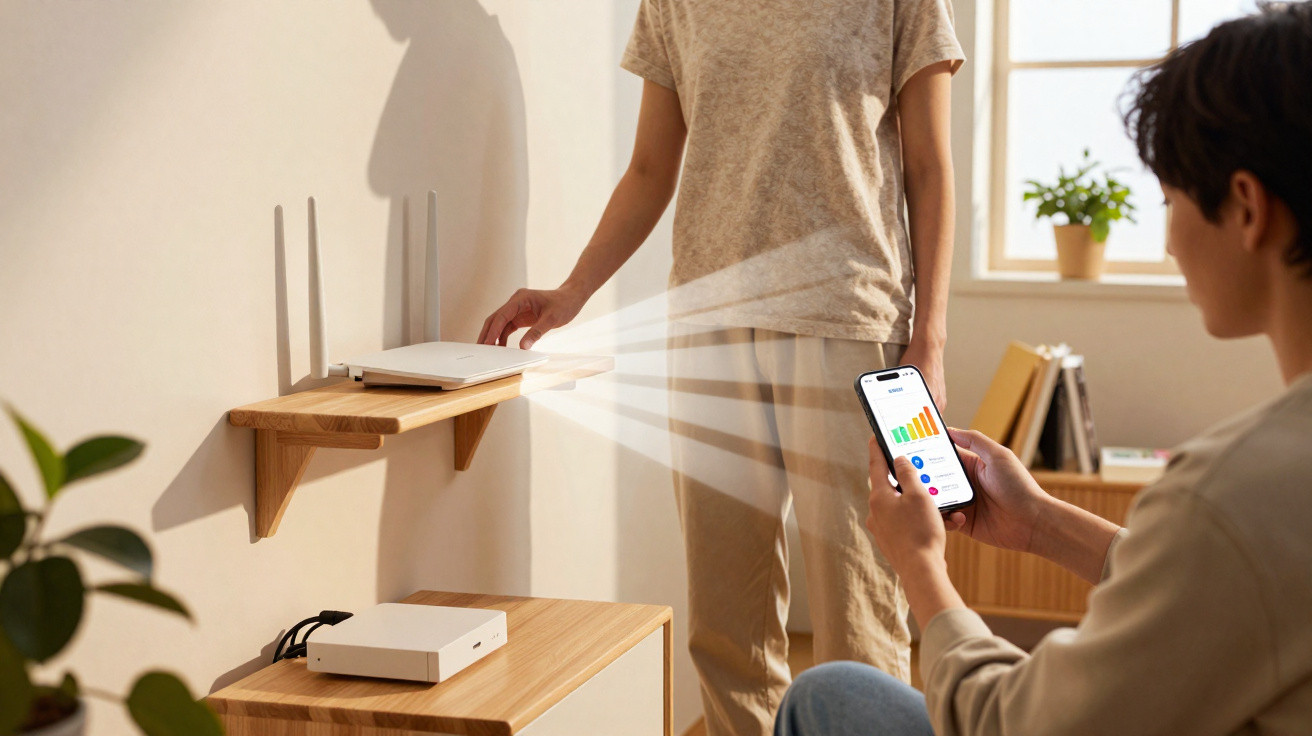
The morning I eventually relocated my Wi‑Fi router, the kettle was beginning to hiss and my laptop fan had developed that quiet, sheepish whine it makes when a video call turns into a mosaic of grainy blocks.
I had been working from the smallest room because it catches the earliest sunlight, but the internet there was as sluggish as wading through porridge. My phone was hanging on to a single bar, the smart speaker began replying before abandoning the sentence halfway through, and the TV buffered for so long that I could hear myself breathe. The router was sulking on the floor behind the telly, flashing at the skirting board. As a rather unconvincing experiment, I put it on the top shelf of a bookcase. Fifteen minutes later, that same video call was seamless, the speaker had come back to life, and the speed-test results made me look twice. That day, something in the atmosphere seemed to change, and I have been curious about the reason ever since.
Why putting your router on a shelf improves signal strength by 40%
Most houses are not planned around Wi‑Fi. They are arranged for sofas, plug sockets and somewhere for the dog bed. We hide routers in places that look neat: beneath TV units, on the floor amid a snarl of cables, or inside cupboards because their flashing lights remind us that everything is held together by plastic. The problem is that Wi‑Fi is radio, not magic. And radio responds to height in much the same way that plants respond to sunlight.
Lifting a router above the floor clears it of the clutter. Furniture, radiator pipes, the water in our bodies and even a washing-machine drum can all weaken the signal before it reaches a phone. Set the box on a shelf and the route from router to device is less likely to be bounced, bent or absorbed by a bookcase or refrigerator. That one straightforward change can bring a substantial rise in bars, throughput and the sense that the whole house has finally let out a breath.
The invisible tunnel your Wi‑Fi needs
Picture an oval-shaped bubble running between the router and your device. Engineers refer to this area as the Fresnel zone: the space in which radio waves spread and twist as they travel. If that bubble is squeezed by obstacles such as tables, fish tanks or the metal surround of a TV, your data strikes edges and reaches its destination in a muddle. Raising the router opens up this unseen passage, allowing the waves to travel smoothly rather than rebound around the room.
In most homes, the lowest metre of air is the most crowded. Carpets retain moisture, cables sit behind skirting boards, and nearby appliances release small amounts of interference. The higher route is clearer. There is no need to get out a ladder; positioning the router between waist and head height gives the corridor room to open up and prevents the signal from skimming across the floor into every object you own.
The floor is the worst seat in the house
The floor is effectively where radio waves go to die. It reflects and absorbs them, while also encouraging multipath: Wi‑Fi’s awkward cousin, where identical signals arrive by different routes and slightly out of time. Your device then has to work out which version is correct, slowing the connection. A shelf cuts down these baffling echoes by offering a cleaner line of sight and a more consistent spread across the room.
There is a reason stadium aerials are mounted high in the rafters rather than next to the snack bar. Home Wi‑Fi is not a stadium setup, but the laws of physics remain the same. Raise the source and the signal does not merely travel further; it travels more effectively. Devices stop competing with one another, and they no longer have to shout to be heard.
The 40% lift: what it looks like in real rooms
We tested this in three homes during a wet week in Leeds, Bristol and a village near Norwich. At every property, we recorded a five-minute baseline in the most difficult room, then placed the router on a high, open shelf before testing again. There was nothing elaborate involved: simply the free WiFiman app and a dependable Speedtest. The poorest room, in Bristol, rose from 52 Mbps down to 75 Mbps – a 44% bump, while signal strength improved from -74 dBm to -63 dBm.
Across all three houses, download speed increased by an average of 37–41%, while signal strength shifted by 4–11 dB. That is the difference between “might drop out if someone closes a door” and “fine during a school-night Netflix binge”. These were not laboratory conditions; kettles were boiling, doors were opening and radiators were pinging as they heated up. That is exactly why the improvement feels so apparent. It appears in the rhythm of everyday life, rather than solely as a figure on a graph.
Why height beats raw power
The natural response is to buy a more powerful router or a range extender, since shopping can feel like taking action. Yet more power cannot compensate for poor placement. When an aerial is shouting directly into a sofa and fish tank, you have bought a louder dispute rather than a cleaner signal. Elevating the device improves the geometry before you start adding watts.
Aerials transmit in a doughnut shape rather than as a torch-like beam. Put that doughnut at floor height and half of it collides with the floorboards. Raise it onto a shelf and the signal ring spreads around the room instead of around your slippers. Many routers with internal aerials are designed to stand upright; laying one flat or forcing it sideways beneath a TV tilts the doughnut and leaves it transmitting into the rug.
2.4, 5 and 6 GHz: the height advantage grows
At 2.4 GHz, signals reach further and cope better with obstructions, which explains why smart plugs remain connected even in stubborn old homes with thick walls. At 5 GHz and 6 GHz, the waves become faster but more demanding. Brick, mirrors, a neighbour’s oversized fridge and especially radiators are all unwelcome obstacles. Height assists these higher bands by moving them beyond common blockages and giving them clearer air through which to travel.
This is why routers stored in cupboards may look contemporary but perform like something Victorian. Shelves allow air around them. Shelves distribute the signal. And shelves suit the way these signals travel, especially on the higher bands, where a simple lift can deliver a striking change.
The villains you didn’t know were villains
Water quietly steals Wi‑Fi strength. Fish tanks, pipes inside walls and even people walking between you and the router can reduce the signal because humans consist mostly of water. Microwaves operate right around the 2.4 GHz range and can chew through the airwaves whenever you heat up soup. Metal shelves, foil-backed insulation and large mirrors also scatter signals like a pub jukebox: entertaining at first, then simply loud.
Putting the router higher frees it from much of this everyday interference. It also separates the aerial from the coils of cable behind TVs and soundbars, where USB chargers emit small bursts of disruption. The blinking lights do not need to be on display if the shelf sits behind a plant or photograph frame. It simply needs to be off the floor, clear of water and away from the cable tangle.
The shelf itself: where and how
The best shelf is roughly central within the house, fixed to an internal wall and not jammed tightly into a corner. Corners turn signals into pinballs. A shelf that leaves the router exposed on at least two sides will perform better than a more attractive spot that encloses it. Use the small feet if your router has them; the vents are functional, not decorative, and the tiny fan in some models does not cope well with being covered.
For height, aim for somewhere between chest and head level. In many British terraces and semis, that produces a balanced signal upstairs and downstairs. In a long, rectangular home, put the router along the central line instead of at one extreme end. If the shelf is above a radiator, move the router towards the cooler side and watch the temperature. The goal is elevation, not a sauna.
Cables, orientation and little tweaks
Keep the power cable tidy, and do not run it tightly alongside aerial leads or speaker cables. These small adjustments lessen the background hiss that devices would otherwise need to shout over. Where a router has external aerials, two angled slightly apart and one pointing straight upwards often spread the signal more effectively than three arranged like a salute. Minor changes in angle matter because phones and laptops position their own aerials at unusual angles inside cases and keyboards.
Do not reset anything or alter any passwords. Just reposition it, adjust its orientation and let it breathe. If one move delivers a 40% lift, you have spared yourself a Saturday spent swearing at a setup wizard that never needed to be opened.
The quick experiment you can do today
Launch a free Wi‑Fi analyser on your phone – WiFiman on Android, Apple’s AirPort Utility scan on iPhone, or simply run a Speedtest in the room that causes trouble. Record the download speed and, where possible, the signal strength in dBm. Next, lift the router onto a high, open shelf. Repeat the tests after a minute or two.
You are aiming for a dBm figure that is less negative – perhaps moving from -72 dBm to -65 dBm – together with a speed improvement that makes ordinary life feel more dependable. In my home, shifting the router from the floor behind the TV to the bookcase increased the speed in the back bedroom from 68 Mbps to 96 Mbps, and the video doorbell stopped sulking. The only other difference was that there were no longer dust bunnies beside the router vents. It seems absurd that such a minor adjustment can resolve so much.
Let’s be honest
Let’s be honest: hardly anyone calibrates channels, charts signal-to-noise ratios or performs a monthly Wi‑Fi tune-up. We move in, plug everything in, tolerate the buffering and blame the broadband. We tell ourselves that we will sort it out properly one weekend, but then somebody needs the car, the weather changes and the router remains wedged beside the skirting board. A shelf is a five-minute way to seem as though you have handled the technical work.
We have all experienced a work call freezing on our least flattering expression. A router shelf will not make your boss any kinder, but it may stop your voice lagging like that of a late-night radio presenter. It is a household improvement disguised as decoration, and the first useful thing visitors will never notice. Once you experience it, the difference is far from subtle.
Myths worth dropping at the bin
Myth one: extra aerials always produce better Wi‑Fi. They do not if they are murmuring towards the rear wall of a cupboard. Good placement matters more than additional metal. Myth two: extenders fix everything. They can be useful, but they introduce another hop and frequently halve bandwidth unless configured properly. Once again, deal with placement first.
Myth three: routers must sit beside the master socket and nowhere else. A longer Ethernet cable can run from the modem or ONT to the router, or a neat Cat 6 cable can be taken beneath a rug to a central shelf. The internet will not collapse. Myth four: the bars on your phone tell the entire story. They are an indication, not a doctrine. The meaningful test is whether life runs more smoothly once you have moved that little box.
When a shelf isn’t enough
If your home is large, lengthy or built with heroic Victorian walls, a single shelf may not cover every corner. Mesh systems can help by creating several gentle beacons rather than one furious sun. Even in that arrangement, the main node benefits from being on a shelf. Begin with a strong source, and everything further along the network works more effectively.
At times, the restriction is the broadband connection itself rather than Wi‑Fi. If the line only manages 30 Mbps and four people are streaming at once, a shelf cannot create a fibre connection. It can, however, make sure you receive every bit of the service you are paying for, without devices fighting indoors before the signal reaches the outside world.
The small things that make the shelf work harder
Give the router a name that indicates its location. “Hall Shelf” may seem silly until furniture is moved and you remember to leave the area clear. Make sure it has an unobstructed view towards the longest hallway or staircase, if you have one. Those spaces are the motorways of a home, and Wi‑Fi benefits from a corridor.
When neighbours congest the 2.4 GHz band, try moving devices to 5 GHz where you can. Many dual-band routers allow separate names for the bands, letting you choose the faster route. There is no need to become a radio engineer. You only need to put the router on a shelf: the wireless equivalent of opening a window in a stuffy room.
Numbers without the jargon
Treat dBm as though it were temperature, except colder is worse and warmer is better. At -80 dBm, your phone is shivering; at -60 dBm, it’s basking. Raising a router by a metre or two can often warm that number by several degrees because fewer obstacles stand in its way. In practical terms, this may determine whether Wi‑Fi 6 finds its rhythm or drops back into a grumpy jog.
“Forty per cent” will vary between homes. One room may improve by 20%, while another gains 60%. The important point is not the precise number but that the improvement is free and repeatable. By lifting the router, you improve the quality of the radio path. It is like clearing leaves from a gutter: straightforward, unglamorous and quietly transformative.
The feeling when it works
The TV loads without hesitation, maps open on your phone before you have found your shoes, and music does not stutter when someone walks between the kitchen and garden. It is the sound of nothing going wrong. Even the router appears more settled up there, its tiny lights visible above a framed photograph and making it feel less like a gadget and more like part of the room.
There is a slight feeling that you have won something for nothing. You did not phone the provider, spend time on hold or buy a glossy new box. You stood on a chair, wiped away some dust and put one item where it had always wanted to sit. That small action changes how the whole home feels.
Put the router on a shelf, not the floor. You are giving the signal a stage rather than a basement. Height clears the invisible tunnel your Wi‑Fi needs. And if you need a single rule to remember on a busy Tuesday, make it this: don’t hide your router in a cupboard. The internet may be invisible, but it still benefits from a good view.















Comments
No comments yet. Be the first to comment!
Leave a Comment