
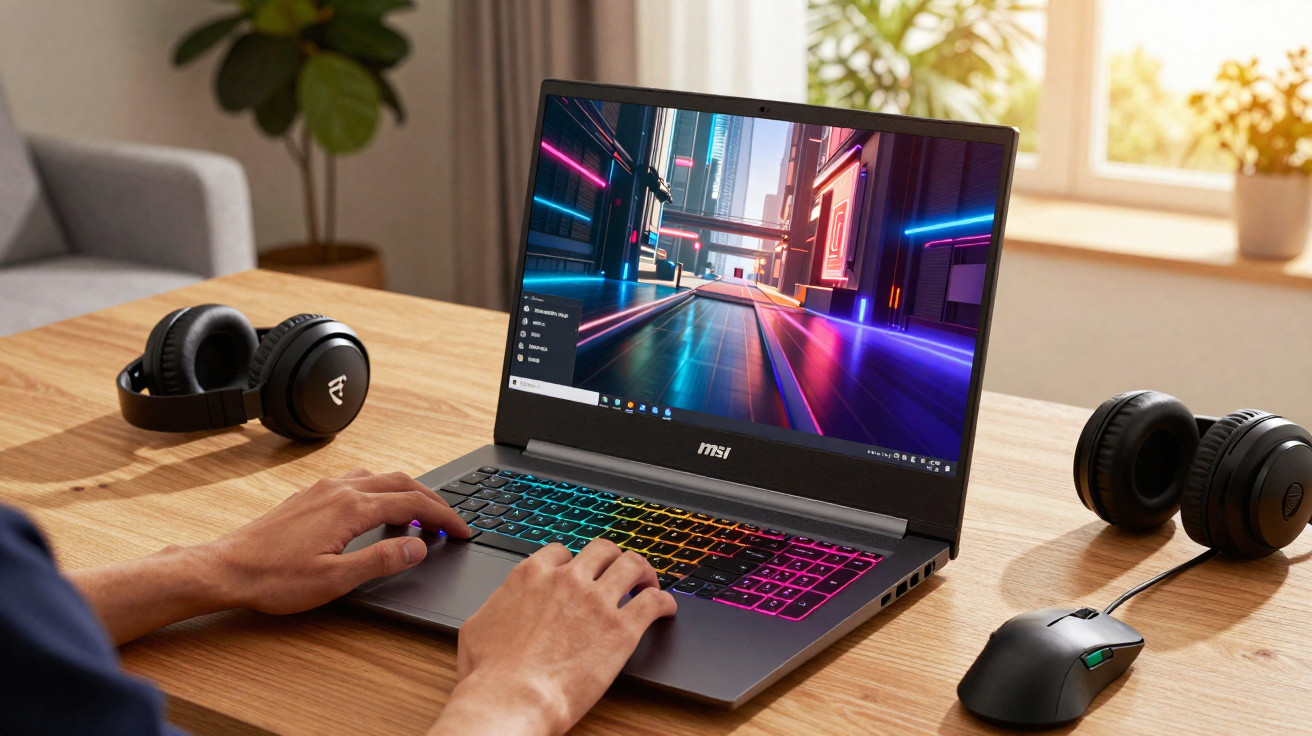
Premium gaming laptop prices are still drifting downwards, and a 16-inch model from MSI has suddenly become a lot harder to ignore than it was a week ago.
Sitting in a slightly in-between category, the Vector 16 HX AI straddles the line between a full-on desktop replacement and a creator-focused laptop. It pairs fresh Intel hardware with a punchy RTX 5070 Ti and a screen that’s clearly built for high-refresh QHD gaming, not for squeezing into a café bag.
A 16-inch machine that actually leans into power
Rather than chasing the ultra-thin “look at me” approach, MSI positions the Vector 16 HX AI as a performance-first portable that’s meant to do a bit of everything. At roughly 2.7 kg, bundled with a 330 W power brick, and equipped with components more commonly found in chunkier 17-inch systems, it’s best thought of as a moveable workstation for gaming and creative work-not a light travel companion.
At the heart of the laptop is Intel’s Core Ultra 7 255HX: a 20-core processor made up of 8 performance cores and 12 efficiency cores, with boost speeds up to 5.2 GHz. Compared with older Intel designs, this newer layout does a better job of separating background activity from heavier workloads, which can improve frame pacing in demanding games and speed up exports when you’re leaning on Premiere, Resolve or Blender.
The Vector 16 HX AI combines a 20‑core Intel Ultra CPU, RTX 5070 Ti graphics and a 240 Hz QHD+ panel at a discounted price.
On the graphics side, MSI uses an Nvidia GeForce RTX 5070 Ti with 12 GB of GDDR7. That amount of VRAM is useful for QHD textures, higher-resolution photo editing and more complex 3D projects. The move to GDDR7 also increases bandwidth versus the GDDR6 still common in many gaming laptops, helping performance stay steadier when both CPU and GPU are under sustained pressure.
A notable 20% price drop on a high-end configuration
The headline here isn’t just the hardware-it’s the money. The Vector 16 HX AI debuted at about €2,499 and is now closer to €1,999. That’s roughly a 20% reduction, or around €500 off. In practical terms, that saved cash could cover upgrades such as a better monitor, a larger SSD, or a solid mechanical keyboard without pushing the overall spend too far.
At this new level, it starts rubbing shoulders with slightly older RTX 4080 laptops and more restrained RTX 4070 options. Plenty of those competitors cut corners somewhere-refresh rate, colour coverage, storage flexibility, or ports. MSI’s approach is to cover as many of those bases as possible, prioritising sheer throughput and upgrade headroom over an ultra-slim chassis.
A €500 reduction moves the Vector 16 HX AI from “specialist purchase” territory into a realistic option for competitive gamers and freelance creators.
Display tuned for QHD gaming and content work
The 16-inch display is a 2560 x 1600 QHD+ panel in a 16:10 aspect ratio. The extra height is handy for coding, editing timelines, and generally fitting more into view at once. For gaming, the 240 Hz refresh rate is aimed squarely at esports and fast shooters, where responsiveness and clarity matter.
MSI also lists 100% DCI‑P3 coverage, which is a better fit for cinema and higher-end video work than the more common sRGB target. That wider gamut can help with colour grading, photography and design-particularly if your output ends up on HDR or wide-gamut screens later. It’s not a substitute for a properly calibrated reference display, but it’s a stronger base than many mid-range gaming panels manage.
Why QHD+ and 240 Hz make sense together
- QHD+ looks meaningfully sharper than 1080p on a 16-inch screen.
- 240 Hz helps cut motion blur and lowers perceived input lag in competitive games.
- DLSS and frame generation can help the RTX 5070 Ti maintain high frame rates at this resolution.
- 16:10 provides more vertical room for UI elements and productivity apps.
In competitive titles such as Valorant, Apex Legends or CS2, the pairing of this GPU and panel should let you aim for high to very high settings while still pursuing triple-digit frame rates. For more cinematic single-player games, leaning on DLSS and easing back some ray tracing settings can keep QHD+ visuals crisp without the “slideshow” feel that 4K can sometimes cause on mobile GPUs.
Modern platform, AI acceleration and future-proof storage
The “HX” suffix is a hint that this machine is designed around a desktop-like power budget, and the platform choices follow suit. The Core Ultra 7 255HX includes dedicated AI hardware, which complements Nvidia’s Tensor cores inside the RTX 5070 Ti. MSI quotes a combined AI compute figure of 992 TOPS across the system. That number is more theoretical than day-to-day, but it signals a system intended to cope with local AI tasks, from video upscaling through to asset generation.
The base memory configuration starts at 16 GB of DDR5, and the laptop can scale up to 96 GB using two SO‑DIMM slots. If you’re working with heavy After Effects timelines, Unreal Engine projects, or several virtual machines at once, that ceiling helps you avoid hitting a hard limit a couple of years down the line.
| Component | Specification |
|---|---|
| CPU | Intel Core Ultra 7 255HX (20 cores, up to 5.2 GHz) |
| GPU | Nvidia GeForce RTX 5070 Ti, 12 GB GDDR7 |
| RAM | 16 GB DDR5, up to 96 GB |
| Storage | 1 TB NVMe PCIe 4.0 SSD + spare M.2 slot (PCIe 5.0) |
| Screen | 16″ QHD+ (2560 x 1600), 240 Hz, 100% DCI‑P3 |
Storage is worth calling out in particular. You get a 1 TB PCIe 4.0 SSD as the primary drive-enough for the OS, a healthy Steam library and active project folders. There’s also a second M.2 slot that supports PCIe 5.0, offering extremely high theoretical speeds as compatible drives become more common. For workflows involving 8K video or large 3D assets, that additional bandwidth can reduce file transfer time and make previews snappier.
Dual M.2 slots, one wired for PCIe 5.0, give the Vector 16 HX AI a clear upgrade path that many thinner laptops lack.
Connectivity and quality-of-life features
MSI doesn’t skimp on ports. The Vector 16 HX AI includes two Thunderbolt 5 connections, HDMI 2.1, 2.5 Gb Ethernet, and SD Express. With Bandwidth Boost, Thunderbolt 5 can reach up to 120 Gb/s, making it suitable for combinations of high-resolution external displays and fast external storage. HDMI 2.1 also supports 4K at 120 Hz, which lines up well with many current TVs and gaming monitors.
For wireless, you get Wi‑Fi 7 (Intel Killer BE) and Bluetooth 5.4. Wi‑Fi 7 is still mostly for early adopters at the router end, but it should become more valuable over time-particularly in crowded areas where older standards can struggle.
The keyboard uses 24-zone per-zone RGB backlighting, aimed at players who like to set lighting per game or profile. There’s also a dedicated Copilot key for Windows 11’s AI assistant features, which are increasingly tied into search, productivity tasks and creative tools. For calls and remote work, the Full HD IR webcam includes a physical shutter and supports Windows Hello for quicker secure sign-ins, while the IR hardware tends to improve face detection in low light.
Where this laptop fits, and where it doesn’t
The Vector 16 HX AI is designed for a particular kind of user. If you’re carrying your laptop daily, the 2.7 kg body and large charger will feel like a burden. And if your usage is mostly web browsing and office work, the performance will be overkill and a cheaper laptop will usually be the more sensible choice.
It makes far more sense as a mostly desk-based machine that occasionally travels to a studio or a friend’s house-and that regularly takes on jobs such as:
- High-refresh QHD gaming with competitive goals.
- Frequent video editing, colour work or 3D rendering.
- Software development involving heavy local builds and container workflows.
- Testing local AI models, upscaling utilities or generative pipelines.
With a 90 Wh battery, you should get several hours of mixed usage, but gaming will drain it quickly. For anything more than a quick session, you’ll want the charger close by, which is typical for laptops in this performance tier.
How to judge if a gaming laptop “deal” is really worth it
Gaming laptop discounts are constant, but plenty of them are less impressive than they look. A straightforward way to evaluate offers like this MSI is to check four basics: GPU class, RAM, display, and upgrade potential. Many cheaper “bargains” quietly rely on a lower-tier GPU, just 8 GB of memory, a plain 144 Hz 1080p screen, or soldered RAM that can’t be expanded.
In this case, the RTX 5070 Ti lands in the upper mid-range to high-end category, 16 GB of RAM is at least workable with a clear upgrade path, the QHD+ 240 Hz panel stands above many alternatives, and the two M.2 slots plus two-slot RAM layout supports longer service life. When a discount applies to a configuration that hits all of those points, it often works out as better long-term value than a slimmer, flashier laptop with sealed internals.
It also helps to project how you’ll use the machine over the next two or three years. If you plan to keep playing new releases at high settings, stream, and perhaps move into video editing, spending a bit extra now on stronger graphics and upgradeable memory can delay the need to replace the laptop. If your needs remain light, a less powerful model on sale may still be the smarter buy.

Comments
На втором месте по росту числа заказов расположился Красноярск (рост на 53% год к году), на третьем — Новосибирск (+49%). Пятерку лидеров замыкают Челябинск (+48%) и Пермь (+46%). Меньше всего за год показатель вырос в Москве — на 26%. В среднем по России показатель составляет 38%.
В пресс-службе Wildberries рассказали, что за 4 месяца этого года количество поставщиков Wildberries из Новосибирской области увеличилось на 72% по сравнению с аналогичным периодом прошлого года https://bayra.market/galantereya-i-ukrasheniya/zhenschinam-ru/bizhuteriya/podveski-i-kulony/podveska-k1-00001586/
Сегодня с Wildberries успешно сотрудничают около 320 поставщиков из региона https://bayra.market/odezhda-ru-5/detyam/novorozhdennym/kostyumy-i-komplekty-ru-2/komplekt-detskiy-shapochka-i-snud-goluboy-r-40-42/
По итогам апреля продажи маркетплейса в штуках в регионе выросли на 170% по сравнению с аналогичным периодом в 2019 году https://bayra.market/ip-klimenko/?category_id=26182
Окупаемость https://bayra.market/produkty-pitaniya-ru/chay-kofe-kakao/chay/chay-azerchay-zelenyy-25-paketikov/
«Не нужно убиваться из-за потерянных денег»
ПВЗ Wildberries https://bayra.market/galantereya-i-ukrasheniya/zhenschinam-ru/bizhuteriya/braslety/braslet-k1-00020684/
Если говорить о продвижении, Шавнев предлагает производителям проработать базу клиентов, кто совершает покупки не часто или делал это давно https://bayra.market/galantereya-i-ukrasheniya/zhenschinam-ru/bizhuteriya/kolca/kolco-k1-00017238/
«Вероятно, у этих клиентов есть какой-то барьер перед покупкой в тех каналах, где вы уже ведете продажи, — говорит эксперт https://bayra.market/galantereya-i-ukrasheniya/zhenschinam-ru/bizhuteriya/sergu/sergi-k1-00018602/
— А дав им возможность купить товар на маркетплейсе вы можете вернуть клиентов дав им удобный инструмент для заказа и на старте получить для своих товаров отзывы, которые будут влиять на дальнейшие продажи» https://bayra.market/galantereya-i-ukrasheniya/zhenschinam-ru/bizhuteriya/sergu/sergi-k1-00002307/
конструкция соответствует выбранному стилю;
Эти инструменты желательно иметь по паре: один – для бытовых целей (нарезать ленты, бумагу и т https://artcraftbouquet.ru/articles/post/cvety-na-14-fevralya
д.), другой – строго для срезки и обработки цветов https://artcraftbouquet.ru/articles/post/kakie-cvety-nelzya-darit-vmeste
Держите инструменты всегда острозаточенными https://artcraftbouquet.ru/articles/post/den-vesennego-ravnodenstviya
Тупые лезвия портят растения, и это негативно сказывается на общем качестве композиции https://artcraftbouquet.ru/magazin/folder/bukety-cvetov-na-14-fevralya/p/8
?
2 https://artcraftbouquet.ru/magazin/product/buket-176
Колледжи и техникумы – предлагают более глубокое изучение флористики, включая ботанику, композицию, декорирование и предпринимательство https://artcraftbouquet.ru/magazin/folder/bukety-dlya-docheri/p/9
Преподавание – проведение мастер-классов, ведение онлайн-курсов и обучение новичков в сфере флористики https://artcraftbouquet.ru/magazin/folder/bukety-skuchayu
Наши флористы создают авторские букеты из свежих сезонных цветов: роз, пионов, тюльпанов, гортензий, ранункулюсов и других премиальных сортов https://artcraftbouquet.ru/articles/post/rozy-proishozhdenie-istoriya
Каждая композиция продумывается до мелочей — от гармоничного сочетания оттенков до оригинальной упаковки https://artcraftbouquet.ru/magazin/product/novogodnyaya-kompoziciya
Благодаря этому вы получаете не просто букет, а эксклюзивный подарок, который невозможно повторить https://artcraftbouquet.ru/articles/post/8-marta-darite-vnimanie
Флористика – это не только работа в цветочном магазине https://artcraftbouquet.ru/articles/post/den-trudyagi-i-den-letnego-otdyha
Возможности для профессионального роста разнообразны:
Leave a Comment