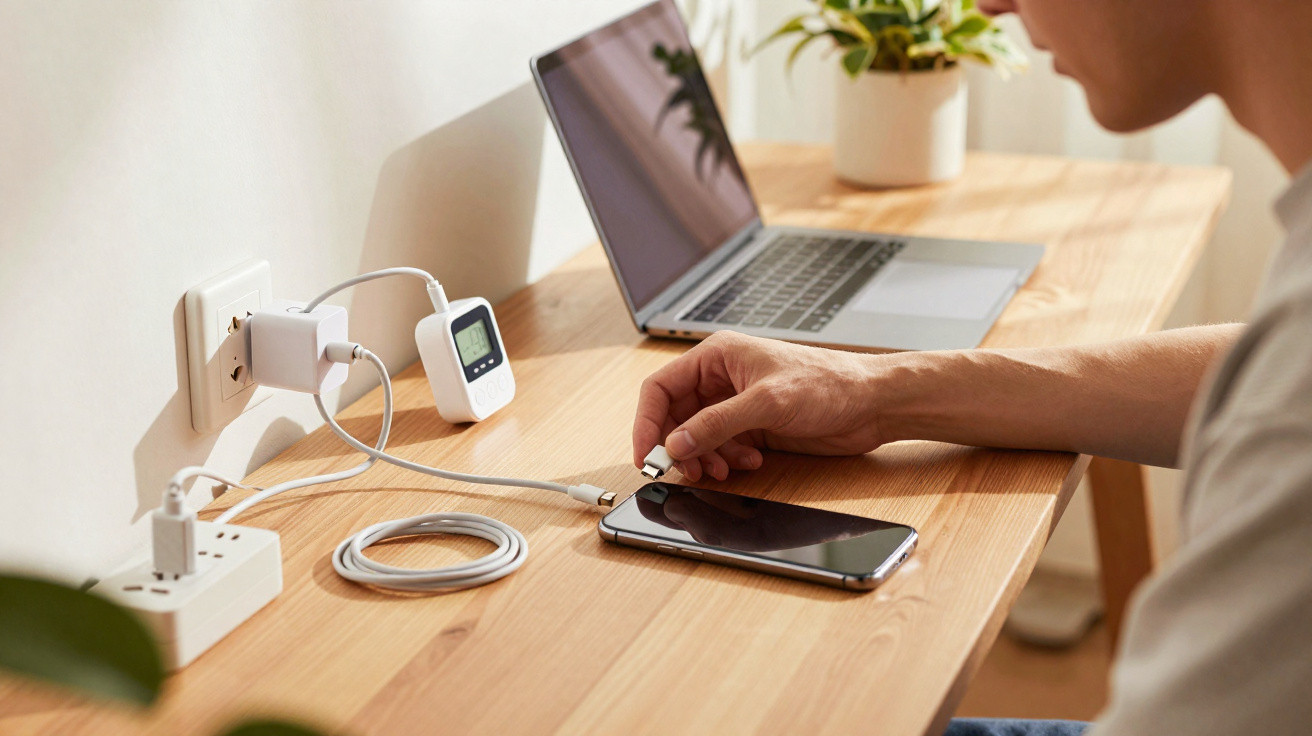
Most people focus only on the battery level when charging their phone. As long as the percentage display is rising, that is all that seems to matter. At first glance, the order in which the charging cable is connected may appear irrelevant. In fact, it matters more than many people realise – particularly for the lifespan of the battery and the sensitive electronics inside the device.
Why the order of connecting the charging cable matters
Every modern smartphone contains a tiny charging controller. As soon as a connector is attached, it monitors voltage, temperature and current. However, if power arrives at an unfavourable moment or through an unsteady connection, brief voltage spikes can occur – small electrical jolts that may cause lasting wear over time.
The way you connect the charging cable helps determine whether your phone receives power smoothly or abruptly.
For this reason, many technicians recommend following a fixed sequence: connect the stable end of the cable first, then connect the phone. This allows power to reach the device in a more controlled way and puts less strain on the connectors.
The safest charging connection order – how to do it properly
A straightforward routine can significantly reduce both risk and wear. It is also quick to turn these steps into a habit.
When charging from a wall socket or extension lead
- Step 1: If it is detachable, first plug the USB cable into the mains adapter.
- Step 2: Plug the mains adapter into the wall socket or extension lead.
- Step 3: Only then insert the connector into the phone.
This means the power source is already stable when the smartphone connects. The charging controller receives a steady, predictable signal rather than having to compensate for sudden changes.
When charging from a laptop, PC or power bank
A consistent order is worthwhile here too, especially with USB ports that can be slightly loose.
- First: Connect the USB plug to the laptop, PC or power bank.
- Then: Wait until the other device has been switched on or woken up.
- Finally: Plug the connector into the phone, taking care not to force it in at an angle.
Particularly on older PCs, plugging in abruptly can briefly overload ports. You may not notice this as a user, but the phone's electronics certainly can.
You can also make major mistakes when unplugging
Disconnecting is at least as sensitive as connecting, especially if the cable is used as a “carrying handle”. Even light strain can rock the plug back and forth in the port. The result can be loosened sockets, contact issues and, in the worst case, an intermittent connection that turns every charge into a test of patience.
Never pull on the cable; always grip the connector itself. This protects both the phone's port and the cable.
The correct order for unplugging
- Disconnect the phone first: Carefully remove the connector from the smartphone while holding the device firmly with your other hand.
- Then disconnect the power source: Remove the mains adapter from the wall socket or extension lead, or unplug the USB connector from the laptop.
If the wall socket is switched off first or the laptop is shut down while the phone remains connected, some devices react with a brief voltage “jolt”. It is not a disaster, but over many years it creates additional stress for the electronics.
Common charging mistakes that can seriously damage your phone
The connection order is only one part of the picture. Many charging habits are convenient, but can become costly over time when they damage the battery or connectors.
Constant fast charging without a break
Fast charging is useful, but it raises the temperature inside the device. Continually connecting your phone to powerful fast-charging adapters places the battery under ongoing strain. A better approach is to use a standard mains adapter or moderate charging adapter for overnight charging, reserving fast charging for occasions when time genuinely matters.
Charging with cheap mains adapters and old cables
Low-cost chargers without certification marks, as well as very old cables, may cause voltage fluctuations. This results in unstable charging cycles during which the battery has to keep regulating itself.
- Look for certification marks such as CE and reputable brands.
- Replace cables if they are bent, loose or have damaged insulation.
- Avoid extremely long, cheap cables – voltage drop is particularly high with these.
Charging in heat or under a pillow
Heat is the greatest enemy of lithium-ion batteries. Charging a phone on a sunny windowsill in summer, or leaving it hidden beneath pillows and bedding overnight, can push temperatures into dangerous ranges. This not only harms the battery but may, in extreme cases, become a safety risk.
A firm, cool surface in the shade is ideal – such as a table or shelf with some space around it for air to circulate.
Keeping an eye on the battery: measuring current
Many users only suspect a problem when their phone suddenly charges very slowly or the cable feels unusually warm. Apps that measure charging current can help assess the situation quickly.
On Android devices, specialist tools show how many milliamps are actually flowing during charging. If the figure repeatedly drops or fluctuates sharply, it may indicate one of the following problems:
- a faulty or cheap mains adapter
- a damaged cable
- a dirty or worn charging port
- an overheated battery protecting itself
These measurements are no substitute for a repair shop, but they offer an initial indication of whether it is worth replacing the mains adapter or cable before the phone is damaged.
Everyday protection for charging ports and the battery
Alongside connecting the cable in the right order, a few easy habit changes can add years to the usable life of your phone.
Keep the charging port clean
Trouser pockets attract dust. Fluff collects in the charging port, settles between the delicate contacts and prevents the connector from clicking properly into place. This makes the connection unreliable, causes the cable to wobble and puts greater stress on the plug.
Loose fluff can be carefully removed with a soft wooden or plastic stick – never metal. Always work gently and do not put pressure on the contacts.
Do not constantly drain the battery completely
Regularly letting the battery fall to 0 per cent before charging it back to 100 per cent puts unnecessary strain on the cells. A range of roughly 20 to 80 per cent is considerably gentler. This does not mean charging to 100 per cent is forbidden – it simply means the battery should not be left fully charged for days at a time.
Why small habits make financial sense
A new smartphone can easily cost several hundred pounds. Often, people replace one not because of its camera or performance, but because the battery and charging port have failed. Many repairs could be avoided by following a few simple rules during daily charging.
Anyone who connects and disconnects cables in the correct order, treats ports carefully and avoids extreme heat can greatly reduce the risk of expensive faults.
Careful handling is especially worthwhile for models with a built-in battery. Replacement is possible, but it is often expensive and inconvenient. Taking a little care while charging extends the time your phone can reliably last through the day – without constantly reaching for a power bank.
The point is not to be afraid of charging your phone. It is enough to establish a few small routines: power source first, phone second; insert the connector gently; never pull the cable; and avoid extreme temperatures. Following these steps will help you use your smartphone for much longer before a new device is genuinely needed.














Comments
No comments yet. Be the first to comment!
Leave a Comment