
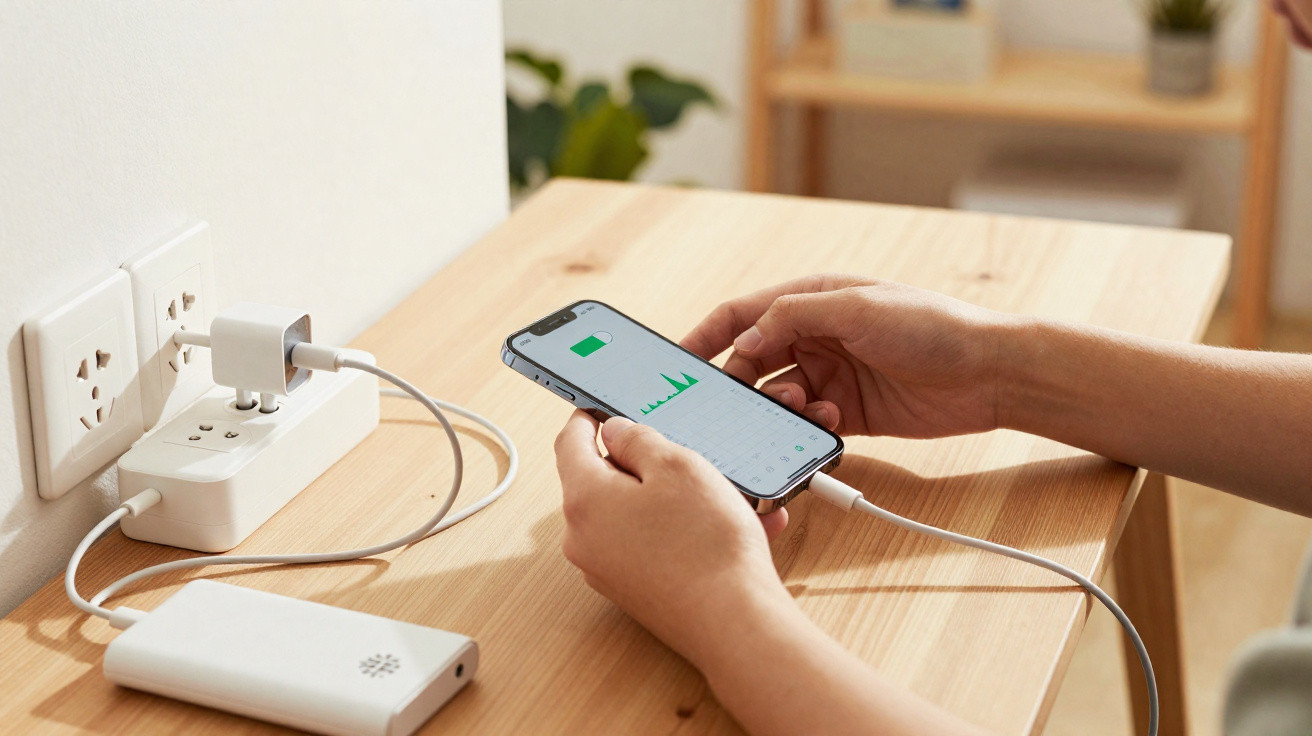
Most people plug a charging cable into their phone and then into the wall socket - or do it the other way round - without giving it a second thought. Yet the order you connect and disconnect can affect the electronics inside the device, the long-term health of the battery, and, in extreme cases, even your safety. A couple of small habit changes are enough to protect your smartphone far better.
The most important rule when plugging in: power first, phone last
Even though modern smartphones can take a lot, the charging port is still the most delicate part. It’s where power, data and tiny contacts all meet. The key principle is simple: make the power source stable first, then connect the phone.
"Rule of thumb: first plug the USB lead into the mains adaptor or the PC, then plug it into the socket - and only at the very end connect it to the phone."
If you are charging from a wall socket, the safest sequence looks like this:
- Plug the USB connector into the mains adaptor
- Plug the mains adaptor into the wall socket
- Wait briefly so everything is seated properly
- Only then insert the connector into the phone
If you push a cable that is already live straight into the handset, you increase the chance of small voltage spikes. You usually won’t notice them immediately, but over months and years they can put extra strain on the charging controller or the contacts inside the device.
Why the charging order matters so much
Inside your smartphone, a dedicated chip controls how much energy the battery receives. That charging controller can be sensitive to fluctuations in voltage. If a brief “power jolt” occurs at the moment you connect, the controller has to compensate instantly.
If it happens occasionally, it’s rarely a problem. However, anyone who charges several times a day with rough plug-in habits repeatedly stresses these components. Over time, that can show up as:
- Charging starts late or occasionally cuts out
- The battery feels slightly warmer than it used to during charging
- The phone only charges at a reduced speed
- The USB/charging port feels “loose” or only works at a certain angle
Cheap adaptors or older extension leads are more likely to produce small spikes. Combined with the wrong connection order, the load on the phone’s electronics builds up.
Common everyday mistake: phone first, then hunt for power
A lot of people do the exact opposite: they plug the cable into the phone first, then look for a free socket or USB port. It’s convenient, but it’s not ideal for the device.
Worse still is walking across the room with the cable already plugged into the phone and then jamming the adaptor into the wall socket with a tug. That puts pulling force on the port at the same time as power is being applied - a double strain.
"If you want to keep your smartphone for longer, treat the charging port like a delicate connector - not like a coat hook."
When unplugging: the right order matters here too
The same idea applies in reverse when disconnecting. Many people pull the connector out of the phone first while the adaptor is still live. A gentler approach is to remove the power first.
Step-by-step: how to disconnect your phone gently from power
- First, unplug the mains adaptor from the wall socket.
- Then disconnect the USB lead from the adaptor (if needed).
- Only at the very end, carefully remove the connector from the phone.
Once the socket is no longer supplying power, the cable is electrically “settled”. After that, you’re only dealing with mechanical stress on the port - which you can further minimise by pulling straight out slowly.
Extra risk: cheap chargers and fast charging
Many people buy low-cost adaptors from online marketplaces. These don’t always follow standards, may output uneven voltage, or have poor surge protection. When you combine that with fast-charging technology, the strain on the phone’s electronics increases significantly.
Fast charging also means higher currents through the connector. If you are frequently connecting and disconnecting under load, the risk of contact issues and overheating rises.
- Use the manufacturer’s original mains adaptor where possible.
- Avoid ultra-cheap no-name chargers.
- If you notice heat: stop charging and try a different adaptor.
Practical tip: check charging current with an app
On Android phones, apps such as "Ampere" can display charging current. That makes it easier to see whether your cable and adaptor are working properly together.
| Reading | What it means |
|---|---|
| Stable current, hardly any jumps | Adaptor and cable are delivering clean power |
| Large fluctuations | Possible issue with adaptor, cable or wall socket |
| Very low current | Cable too thin, adaptor too weak, or port is dirty |
These tools aren’t a replacement for a repair shop, but they do help you judge how “healthy” your charging set-up is.
Danger from incorrect charging: from loose connections to fire risk
Most issues develop gradually. First the phone only charges if the cable sits at a particular angle; later the port can feel worn out. In the worst case you might see sparks, or the plastic around the connector may discolour.
If dust or pocket lint is also lodged in the port, heat can build up. In rare situations, plugs or adaptors can overheat so badly that there is a fire risk - especially if the phone is charging on a sofa or under a cushion.
"A gentle charging routine only takes a few seconds, but it can save your device from expensive repairs - or, in a real emergency, from the consequences of a fire."
How solar panels and power banks charge your phone - and what to watch out for
More and more people top up their smartphone on the go using power banks or solar panels. With these sources, voltage can vary even more - for example when a cloud covers the sun or when the power bank is nearly empty.
With mobile power, the rule matters even more: stabilise the power source first, then connect the phone. In practice, that means switching the power bank on or positioning the solar panel, waiting a moment, and only then plugging in the smartphone.
Additional protective habits that are kinder to the battery
Beyond the order of plugging in and unplugging, a few simple routines can help keep the battery in better shape for longer:
- Try to keep the battery between 20% and 80% rather than constantly “cooking” it at 100%.
- Avoid high heat while charging, such as in a car parked in the sun.
- Don’t charge the phone under cushions, blankets or inside a thick case.
- Don’t rely on constant tiny “top-up” charges that only last a few minutes.
Many manufacturers now include charging modes that limit overnight charging to around 80%, then finish to 100% shortly before you wake up. Enabling that kind of feature in settings can noticeably reduce battery stress.
Why the charging port is so sensitive
The charging port has to do a lot: carry power, transfer data and often output video. Inside are fine metal springs that press precisely against the connector. Any sideways pressure or sharp tug bends those parts slightly.
Add dust, trouser-pocket lint and moisture, and you have a combination that almost invites contact problems. If you always insert the cable straight, follow the correct connection order, and occasionally clean the port carefully with compressed air or a wooden stick, you improve the chances that the connector will last the full life of the handset.
In the end, your smartphone’s lifespan isn’t determined only by the battery and display, but also by that small port on the bottom edge. Treat it as a fragile component rather than a sturdy loop to pull on, and you may avoid an expensive repair - or replacing the phone sooner than necessary.



Comments
No comments yet. Be the first to comment!
Leave a Comment