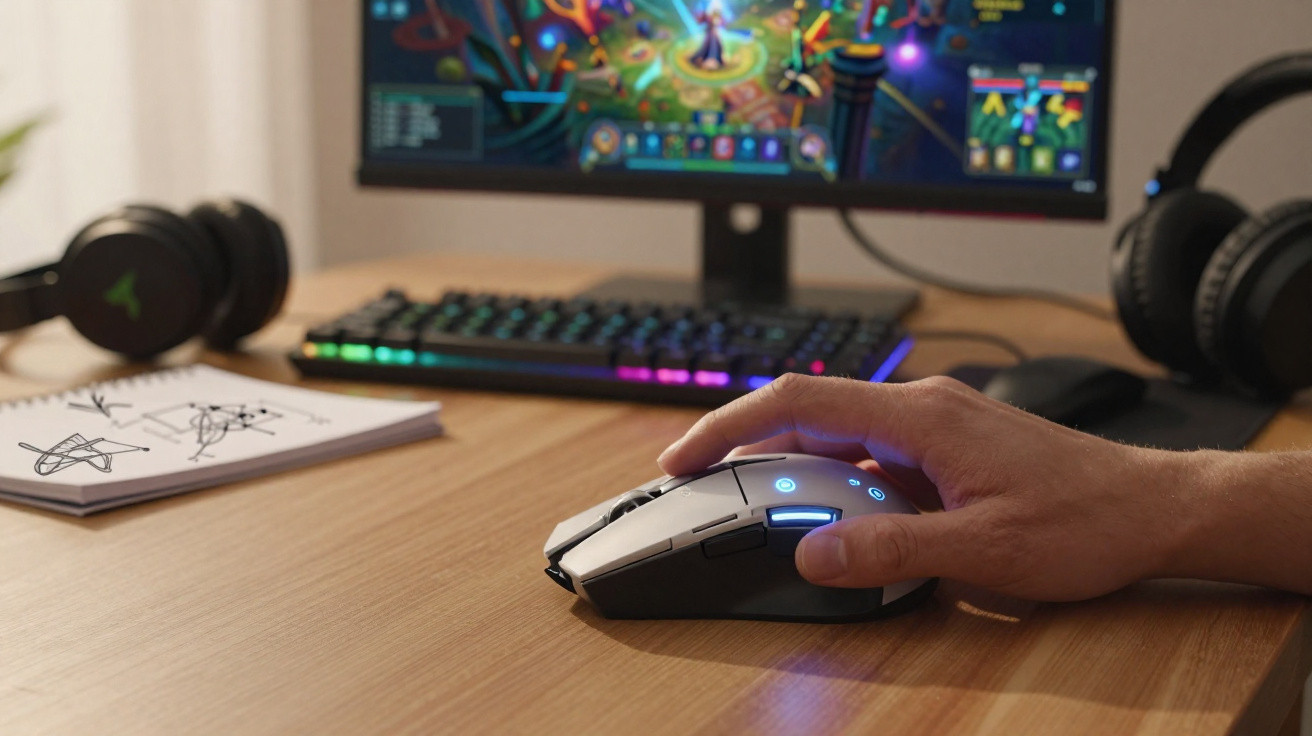
The Razer Naga V3 Pro is Razer’s latest gaming mouse. Its defining feature is the bank of twelve side buttons - but what are they actually for? We put it through its paces.
I am a serious MMORPG player. Judge me all you like; it will not change a thing. For more than 25 years, I have been exploring these vast virtual worlds with stars in my eyes, and I still have not had enough. That makes me exactly the audience Razer is targeting with its new mouse: the Naga V3 Pro.
The Naga is one of Razer’s longstanding mouse ranges. Its signature feature is a set of twelve side buttons designed to meet MMO players’ needs. This 2026 edition, called the Razer Naga V3 Pro, aims to appeal to a wider audience with interchangeable side panels suited to every gaming style. We ran plenty of instances with it - but is it still the best mouse in its class?
What does the Razer Naga V3 Pro offer?
The Razer Naga V3 Pro retains the range’s iconic design. In practice, it differs little from the Naga V2 Pro released in 2023. Its rear remains notably rounded, allowing the body to nestle naturally into the palm for an excellent grip. Even players with larger hands who favour longer mice - including us - should find it a comfortable fit. The illuminated logo is still here, ideal for more eye-catching setups. There is no thumb rest, but the comfortable ring-finger rest conceals a small trick.
It is actually a third click, housing a customisable function. By default, for example, it activates Hypershift, a feature that lets every other button take on a second command. It can also be assigned to push-to-talk, freeing up a finger from the keyboard. It is effective, useful and a genuine advantage over rival products. Those who prefer a simpler setup need not worry: the click can simply be disabled.
What truly sets the Razer Naga V3 Pro apart on the market is its side-button system. Out of the box, it offers twelve additional buttons, which are genuinely valuable in MMOs, where useful spells tend to pile up. The side panel can, however, be removed and swapped for either of the two alternatives: one with six buttons and another with only two. As a result, the Naga V3 Pro also suits less complex games, including FPS titles, RTS games, management games, and multiplayer titles such as PUBG or LoL. MMO fans do occasionally play something other than World of Warcraft, TESO or FF14. Better still, the panel system is extremely straightforward, as the plates are easy to remove and fit.
Another Naga strength is its compatibility with Razer’s Mouse Dock Pro. Connected directly to a PC, this small magnetic stand lets you charge the wireless mouse. It is handy, and you quickly get into the habit of placing the mouse on it whenever you are AFK (away from keyboard). The result is that you never run out of charge, with battery life approaching 150 hours in 2.4 GHz mode.
On the technical side, Razer has equipped its mouse with a sensor capable of reaching 50,000 DPI. There is also a free-spin scroll wheel, adjustable using a button, which can be extensively configured in Razer Synapse - sluggish software, but essential nonetheless. Finally, the redesigned primary clicks are pleasing and responsive, although a little noisy. This is not a revolution on the scale of the Logitech G Pro X2 Superstrike, but rather a tried-and-tested formula. Like any gaming mouse, the Naga V3 Pro can connect via cable, Bluetooth or 2.4 GHz using a dongle, which can be stored inside the chassis. In short, its technology is as good as it gets, but does that make it a good mouse?
My experience with the Razer Naga V3 Pro
Let us remove any suspense immediately: I loved using the Razer Naga V3 Pro. Few mice have convinced me so thoroughly over the long term. Recently, only the Basilisk V3 Pro - also from Razer - and the Pro X2 Superstrike had impressed me so much straight after launch.
Its performance won me over, as did its polished design, which remains comfortable after several hours. Above all, though, it is the proposition that makes it unique. For an MMORPG player, the twelve side buttons are far from a minor detail. During raids, they provide unmatched comfort. Add Hypershift, which doubles the available options, and there is barely any need to touch the keyboard or reach for commands at the far end, such as spells assigned to the 7, 8 or 9 keys. There is naturally a short adjustment period, but once the muscle memory is there, it is a joy, whether tackling demanding raids or playing more casually.
Players who do not play MMOs can rest assured. The other panels do exactly what they should. We particularly liked the simply perfect placement of the two-button panel. The six-button panel is equally capable and proves very comfortable in moderately complex titles, such as city builders and management games. Consequently, the Razer Naga V3 Pro is also a sound option if you play competitive FPS games, single-player adventure titles or strategy games.
More than its advanced specifications, comfortable design or sheer number of buttons, it is in everyday use that this Razer Naga V3 Pro wins you over. It is quite simply the essential mouse for MMO players, while also being one of the best gaming mice on the market overall. That quality does justify its price, even if it does come in at €200. Razer has produced its best mouse yet - at least until the Basilisk V4 Pro arrives?
Razer Naga V3 Pro
€199
Overall rating
9.0/10
What we like
- Impeccable design
- Interchangeable side panels
- The 12 buttons are a delight for MMO gaming
- Technically accomplished
- Wireless charging
What we like less
- Razer Synapse, software that remains just as sluggish
- The price










Comments
MichaelKed
Производство и изготовление эксклюзивной мебели
При выборе мебели для детской комнаты важно правильно подобрать материал https://mebel-er.ru/portfolios/mebel-dlya-spalni
LarryScase
Преимущества:
Комиссионные могут варьироваться от 1,5% до 10% в зависимости от ликвидности объекта и условий сделки https://белый.москва/
В крупных агентствах брокеры обычно получают от 40% до 70% от общей суммы комиссии, в зависимости от опыта и структуры агентства https://белый.москва/projects
Благодаря работе с этими специалистами, покупатели недвижимости смогут сэкономить свое время, которое могло бы быть потрачено на поиски вариантов, и без проблем заполнят все документы, так как этот вопрос будет под контролем профессионалов https://белый.москва/zhk-very
При этом брокеры всегда на связи с клиентами https://белый.москва/zhk-ever
При необходимости они разъяснят все вопросы, помогут с любыми возникшими ситуациями https://белый.москва/projects
Стоимость услуг эксперта - это определенный процент от сделки, его специалист и покупатель определяют на этапе составления договора о сотрудничестве https://белый.москва/cookie-policy
Нестабильный доход https://белый.москва/cookie-policy
Заработок зависит от количества сделок и их размера, что делает доходы непредсказуемыми https://белый.москва/cookie-policy
В кризисные периоды или в праздники доход может существенно снизиться https://белый.москва/zhk-ever
Помощь в оформлении сделки и соблюдение конфиденциальности информации https://белый.москва/zhk-very
Если говорить простыми словами, то брокер - это специалист, который помогает клиенту подобрать для него наиболее подходящий вариант квартиры, дома или другой недвижимости https://белый.москва/projects
Каждый брокер специализируется в своей нише, постоянно поднимая в ней уровень своих знаний и профессионального мастерства https://белый.москва/zhk-very
Кроме стандартных процедур таких, как подбор жилья, организация показов, переговоры со второй стороной, он может помочь с заявками на ипотеку, подбором более выгодных программ страхования https://белый.москва/zhk-lunar
После оформления договора купли-продажи недвижимости брокер зачастую продолжает сотрудничать с клиентами https://белый.москва/
Leave a Comment