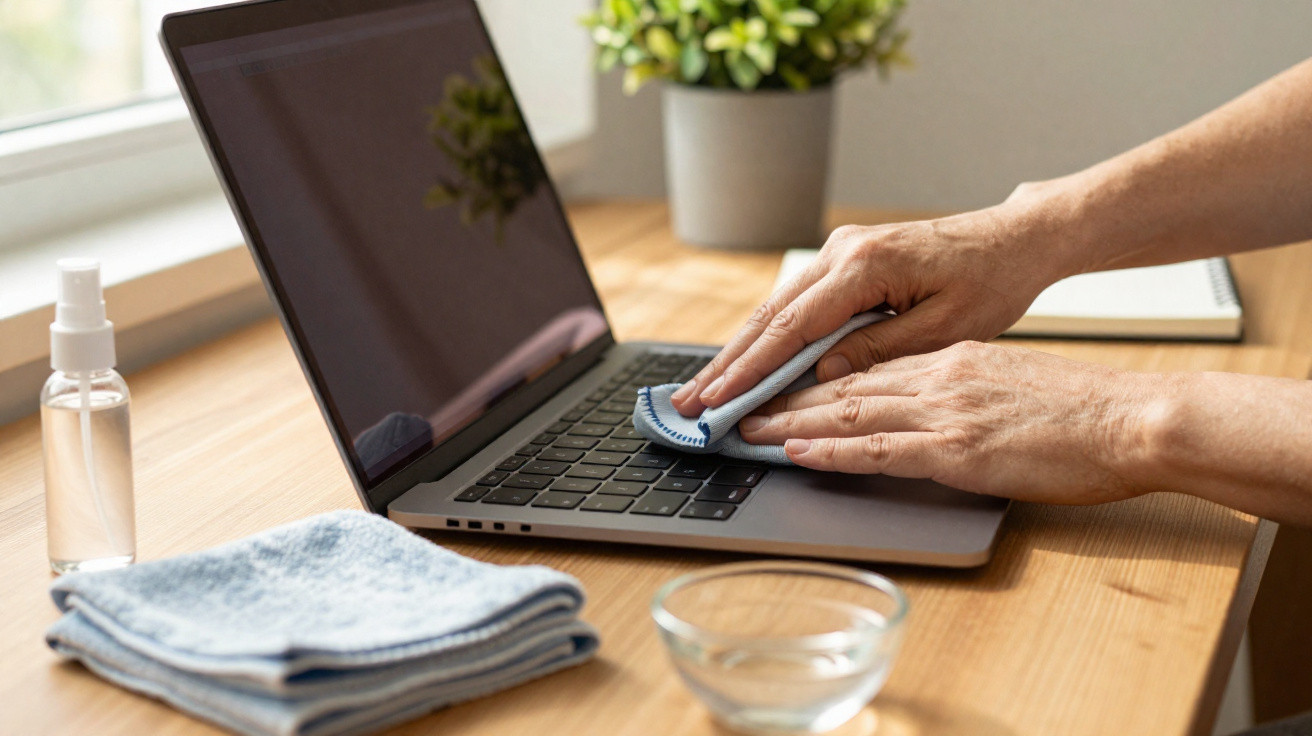
The café was nearly silent, apart from the muted whirr of laptops and the clink of cups.
At a table in the corner, a student bent over her display, peering through a film of fingerprints and dust. With a swift, faintly sheepish movement, she rubbed the glass with her sleeve, only to stop when a pale rainbow smear remained. A couple of tables away, a designer unfolded a small grey square from his bag - a microfiber cloth - and cleaned his MacBook with a surgeon’s concentration. The issue was identical, but their responses could not have been more different. By this evening, one person will have forgotten it happened. The other is quietly helping to prolong the life of a screen worth several hundred pounds. Most of us behave far more like the person using a sleeve than the surgeon. That is where the damage begins.
Why your laptop screen is more fragile than it looks
A laptop screen may seem like a sturdy pane of glass: hard, fixed in place and easy to wipe. In fact, it is a slim stack of materials finished with a sensitive coating that does not tolerate scratches or aggressive chemicals. Finger oils, dust particles and even minute grains of sand carried in your bag can behave like unseen abrasive paper. A careless pass with a paper towel drags those particles over the surface. The display itself may survive, but its coating may not. Microfiber cloths alter the outcome because they collect the particles rather than moving them around.
Consider how you clean spectacles. Anyone who wears glasses quickly learns that a T-shirt means scratches, while a soft cloth means clear sight. Laptop screens react in much the same way. A 2022 repair survey by a major US electronics chain found that an increasing proportion of screen replacements for laptops less than three years old were caused not by falls, but by “cosmetic damage creeping into functional issues” - meaning minor scratches that developed into more serious faults. We seldom spot the earliest marks. Instead, we notice when text begins to appear misty or a bright area reflects light oddly. By that point, the damage is already established.
Microfiber acts rather like a gentle magnet for grease and dust. Its individual threads are divided into extremely fine fibres, creating a vast surface that resembles a woodland of tiny hooks rather than an ordinary cloth. As you clean your laptop screen, those fibres draw in dust and oil and retain them, instead of allowing them to slide over the glass. That one distinction - capture versus drag - helps preserve the anti-reflective coating. It makes a potentially harmful action into a safe routine. Across months and years, that routine is what distinguishes a screen that still appears “new-ish” from one that looks older than the laptop itself.
How to actually clean with microfiber without making things worse
The safest way to clean a screen starts before the microfiber cloth reaches your laptop. Switch the device off and allow the display to cool down; warmth makes marks harder to remove and can encourage you to apply too much pressure. Take a clean, dry microfiber cloth and give it a light shake to remove any loose dust. Next, begin in the middle of the screen and use broad, gentle circular motions, as if polishing a lens rather than scouring a worktop. A light touch is sufficient. When a mark will not shift, make several gentle passes over it instead of pressing more firmly. Let the cloth’s fibres do the job, rather than relying on force.
Many people only clean a laptop screen once the smudges become impossible to ignore. Let’s be honest: nobody really does it every day. That is perfectly fine. What counts is the method you use when you finally decide to do it. Avoid tissues, paper towels, kitchen roll and the sleeve of your jumper - all appear harmless, but can contain fibres and dust that leave scratches. If the display is particularly dirty, apply a light mist of screen-safe spray to the cloth, never directly to the screen. That small precaution prevents liquid from entering the edges and leaving marks beneath the glass. On a difficult day, less pressure and more patience is better than any shortcut labelled a “deep clean”.
Repair technicians regularly repeat one starkly simple point:
“The screen doesn’t usually die in one big mistake - it dies from the same small mistake repeated for years.”
- Keep one microfiber cloth solely for screens, rather than using it for glasses, tables and everything else.
- Wash the cloth gently once it feels greasy or starts leaving streaks, then lay it flat to air-dry.
- Keep it in a sleeve, case or pocket, away from crumbs, keys and pens.
- Do not use glass cleaner, alcohol wipes or household window sprays.
- When travelling, place a folded microfiber cloth between the keyboard and screen to limit friction.
The quiet power of small, careful gestures
There is a subdued pleasure in opening your laptop to find a screen that looks almost as it did on the day you took it out of the box. There is no faint scratch catching the light and no dull, cloudy area in the corner caused by years of rough cleaning. On a hectic Monday morning, that extra clarity can feel like having control over at least one part of your digital disorder. It is a very small ritual - take out the cloth, make a few light circles, close the lid - but it changes how “old” the device feels every day. We all recognise that subtle point at which a device starts to look worn out before it truly is.
On a more personal level, this concerns how we look after the tools that influence our lives. Your laptop contains your photographs, your work, your late-night internet rabbit holes and your unfinished ideas. Spending twenty seconds cleaning it gently with the proper material delivers a small message: this matters. That message can encourage you to treat it better in general - no more dropping it onto the sofa or pushing it unprotected into a backpack filled with chargers and receipts. One small microfiber habit can affect the entire lifespan of your machine.
We have all tilted a screen and suddenly noticed a network of micro-scratches that had gone unseen. It is like discovering fine cracks in a window through which you look all day. Microfiber cannot undo existing damage, but it marks a boundary: from now on, no more careless harm. It is a low-tech answer in a high-tech world, and that is strangely part of its appeal. One soft cloth, a gentler touch and a new instinctive response. It is the kind of quiet improvement that never appears on a specification sheet, yet becomes visible every time the screen lights up.
| Key point | Detail | Benefit for the reader |
|---|---|---|
| Microfiber versus friction | Microfiber captures dust and oils instead of pulling them across the coating. | It limits micro-scratches and helps the screen retain its new appearance for longer. |
| A good cleaning routine | Turn off the laptop, use a dry cloth and wipe gently from the centre in soft circles. | This straightforward habit reduces the chance of streaks, damage and expensive repairs. |
| Products to avoid | Do not use tissues, paper towels, glass cleaners or alcohol-based sprays. | It prevents unseen coating damage that may result in dull, hazy displays. |












Comments
LarryScase
Заработок брокера чаще всего зависит от комиссионных, а не от фиксированного оклада https://белый.москва/zhk-vnukovo-country-club
В Москве начинающие специалисты могут зарабатывать от 100 до 150 тыс https://белый.москва/projects
рублей, а с опытом от 300 тыс https://белый.москва/cookie-policy
до 1 млн рублей https://белый.москва/zhk-very
В регионах зарплаты могут быть ниже — от 100 до 400 тыс https://белый.москва/zhk-ever
рублей https://белый.москва/
Зарплата брокера на статусе ИП зависит от количества сделок и процента комиссии, установленного девелопером https://белый.москва/zhk-vnukovo-country-club
Брокера лучше искать по рекомендациям https://белый.москва/
Часто случается так, что одни и те же специалисты работают с целыми семьями https://белый.москва/projects
Для брокеров важно сохранить свою репутацию в профессиональном сообществе, поэтому они стараются максимально закрыть все вопросы клиентов, касающиеся недвижимости https://белый.москва/zhk-lunar
Среди личностных навыков брокеров, которые обязательны для работы, можно выделить способность найти контакт с любым человеком, наличие широкого кругозора, умение работать на долгосрочную перспективу без потери интереса к клиенту после приобретения им жилья, стрессоустойчивость, умение оперативно решать возникающие проблемы и наличие эмоционального интеллекта https://белый.москва/zhk-champine
Самое важное - брокер имеет более узкую специализацию https://белый.москва/zhk-lunar
Он выбирает для себя определенную нишу - это может быть что угодно от новостроек до премиум-сегмента https://белый.москва/zhk-lunar
Но специалист начинает погружаться в эту сферу, чаще всего работает напрямую с определенными застройщиками, банками и страховыми компаниями https://белый.москва/zhk-champine
Кроме того, он может помочь с оформлением ипотеки или обустройством жилья https://белый.москва/zhk-ever
То есть это максимальное погружение в определенное направление недвижимости и полное сопровождение клиента на всех этапах https://белый.москва/
Брокер — это специалист, который помогает клиенту приобрести недвижимость на первичном рынке, начиная с поиска подходящих объектов и заканчивая сопровождением сделки https://белый.москва/zhk-very
Брокер может помочь клиенту с ипотечным кредитом и оформлением страховки https://белый.москва/cookie-policy
Его работа заключается в том, чтобы представить интересы как покупателя, так и застройщика https://белый.москва/zhk-very
Вознаграждение брокера представляет собой процент от сделки, который выплачивает девелопер https://белый.москва/
Важной частью работы является сопровождение всех этапов сделки, включая подготовку и проверку юридических документов https://белый.москва/zhk-champine
Брокеры также предоставляют актуальные данные о состоянии рынка и возможных инвестиционных перспективах, таких как создание финансовых моделей, SWOT-анализ и другие исследования рынка недвижимости https://белый.москва/zhk-champine
Это помогает клиентам максимально эффективно оптимизировать доходность своих вложений https://белый.москва/zhk-ever
Комиссионные могут варьироваться от 1,5% до 10% в зависимости от ликвидности объекта и условий сделки https://белый.москва/zhk-very
В крупных агентствах брокеры обычно получают от 40% до 70% от общей суммы комиссии, в зависимости от опыта и структуры агентства https://белый.москва/zhk-lunar
Leave a Comment